Page tree

Versions Compared

Key

  • This line was added.
  • This line was removed.
  • Formatting was changed.

Status
title릴리즈 2.17.2311 이상

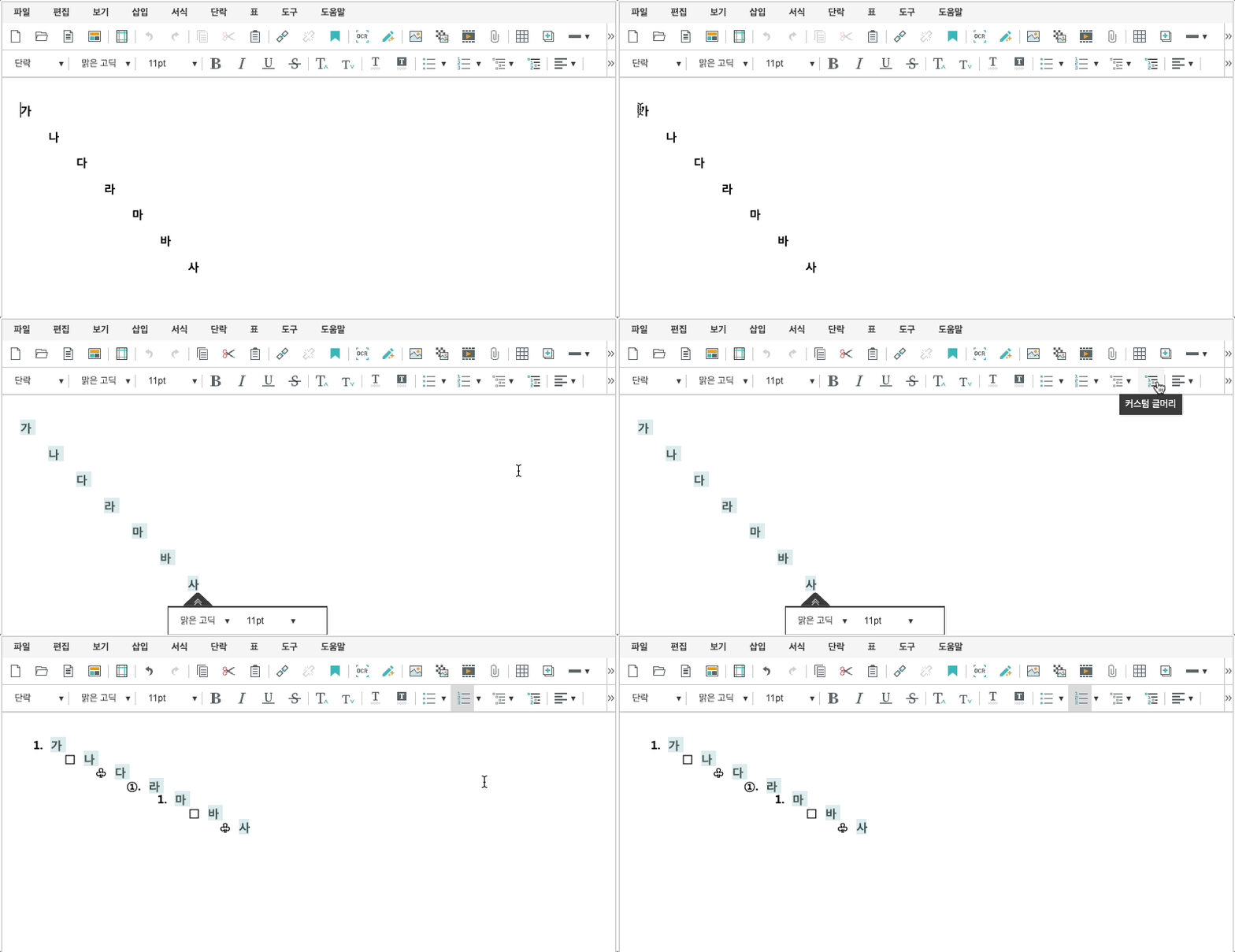
커스텀 글머리를 설정 할 수 있습니다.

커스텀 글머리 설정

'editor.list.customList'를 이용하여 커스텀 글머리를 설정할 수 있습니다.


config  설정하기

levelText
  • 글머리 기호 정의
  • format: 'bullet' 일 때만 동작
    KeyType설명
    formatstring
    format 종류
    • format에 적용할 수 있는 글머리 번호 종류는 아래와 같습니다.

    종류결과 값
    decimal

    1.

    decimalEnclosedCircle

    decimalParentheses(1)

    upperLetter

    A.

    lowerLetter

    a.

    upperRoman

    I.

    lowerRoman

    i.

    ganada

    .

    chosung

    .


    levelTextstring
    • format이 bullet 일 경우에만 유효합니다.


    Code Block
    language
    jsthemeEmacstitle
    synapeditor.config.
    js
    {
    'editor.list.customList': [
    	{ format: 'decimal' },
    	{ format: 'bullet', levelText: '□' },
    
    //
    	{ 
    1레벨
    format: 
    기호 글머리 (사각형)
    'bullet', levelText: '♧' },
    	{ format: '
    decimal
    decimalEnclosedCircle' }
    // 2레벨: 숫자
    
    
    글머리 (1., 2., 3. …) ] }runStyle 
    ]


    runStyle

    Object

    Status
    colourYellow
    title릴리즈 3.2.2509 이상


    Status
    colourYellow
    title릴리즈 2.20.2509 이상

    • runStyle 속성을 추가하면 글머리에 원하는 스타일을 추가할 수 있습니다.


    keyType설명
    colorstring | Object글자 색상
    fontSizeObject
  • format
    • bullet
      • 글머리 기호
      • levelText를 이용하여 원하는 기호를 직접 설정 가능
    • 그 외
      • 글머리 번호
      • format에 지정된 번호 스타일대로 글머리가 표현됨
      • levelText는 적용되지 않음
  • 글자 크기
    underlineboolean밑줄
    italicboolean기울임
    strikeboolean취소선
    fontWeightnumber글자 굵기
    backgroundColorstring | Object배경색


    제약 사항

    • 커스텀 글머리는 최대 9레벨까지 설정할 수 있습니다.
    • 9레벨을 초과해서 정의된 항목은 표시되지 않습니다.
    • 설정 배열이 빈 배열([])일 경우, 커스텀 글머리 기능은 동작하지 않습니다.
    • 설정한 항목 개수가 9개보다 적을 경우, 정의된 항목이 반복되어 9레벨까지 자동으로 채워집니다.

    설정 예시

    Code BlocklanguagejsthemeEmacstitlesynapeditor
    • .
    config.js
    {
    	'editor.list.customList': [
    		{ format: 'bullet', levelText: '□' }, // 1레벨: 기호 글머리 (사각형)
    		{ format: 'decimal' }			      // 2레벨: 숫자 글머리 (1., 2., 3. …)
    	]
    }

    글머리 번호 종류

    format에 적용할 수 있는 글머리 번호 종류는 아래와 같습니다.

    종류결과decimal

    1.

    decimalEnclosedCircle

    decimalParentheses(1)

    upperLetter

    A.

    lowerLetter

    a.

    upperRoman

    I.

    lowerRoman

    i.

    ganada

    .

    chosung

    .


    적용 예시


    Code Block
    languagejs
    'editor.list.customList': [
    	{ format: 'decimal' },
    	{ format: 'bullet', levelText: '□' },
    	{ format: 'bullet', levelText: '♧' },
    	{ format: 'decimalEnclosedCircle' }
    ]


    스타일을 적용 
    Status
    colourYellow
    title릴리즈 3.2.2509 이상
     
    Status
    colourYellow
    title릴리즈 2.20.2509 이상

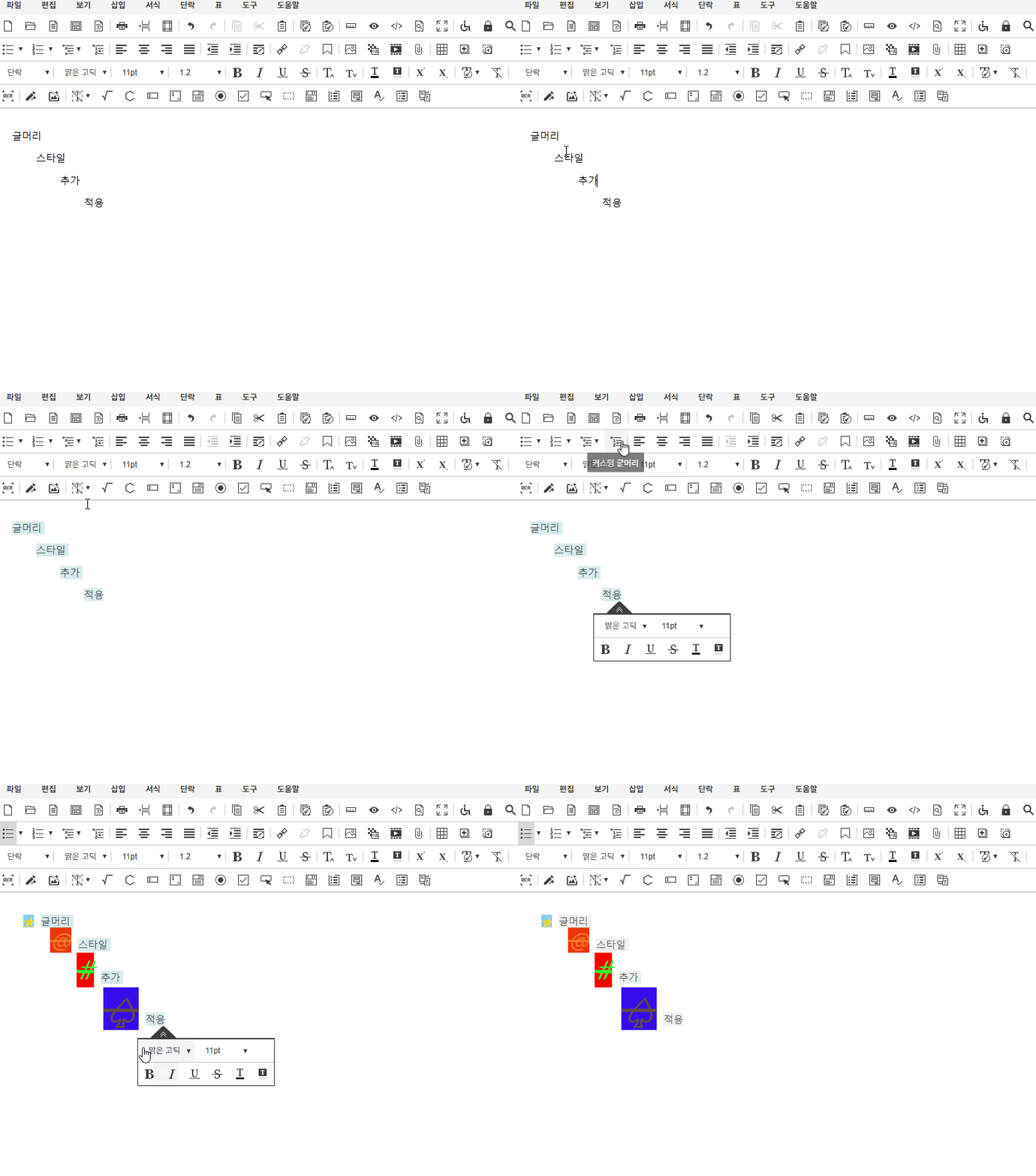
    커스텀 글머리에 스타일을 적용할 수 있습니다.

    config 설정에 runStyle 속성을 추가하면 글머리에 원하는 스타일을 추가할 수 있습니다.

    커스컴 글머리 지원 스타일 속성

    속성명설명color글자 색상fontSize글자 크기underline밑줄italic기울임strike취소선fontWeight글자 굵기backgroundColor배경색

    제약 사항

    • config 설정에 runStyle을 설정하면, 에디터 편집 시 사용자가 적용한 스타일보다 runStyle 설정이 우선 적용됩니다.


    적용 예시


    Code Block
    languagejs
    'editor.list.customList': [
            {
                format: 'bullet',
                levelText: '★',
                runStyle: {
                    color: { r: 255, g: 0, b: 0 }'yellow',
                    fontSize: { value: 12, unit: 'pt' },
                    underline: true,
                    italic: true,
                    strike: true,
                    fontWeight: 700,
                    backgroundColor: { r: 135, g: 206, b: 250 }
                }
            },
            {
                format: 'bullet',
                levelText: '@',
                runStyle: {
                    color: { r: 255, g: 123, b: 45 },
                    fontSize: { value: 24, unit: 'pt' },
                    italic: true,
                    strike: true,
                    backgroundColor: { r: 235, g: 55, b: 12 }
                }
            },
            {
                format: 'bullet',
                levelText: '#',
                runStyle: {
                    color: { r: 45, g: 255, b: 45 },
                    fontSize: { value: 32, unit: 'pt' },
                    italic: true,
                    strike: true,
                    backgroundColor: { r: 205, g: 126, b: 36 }'red'
                }
            },
            {
                format: 'bullet',
                levelText: '♤',
                runStyle: {
                    color: { r: 123, g: 255, b: 45 },
                    fontSize: { value: 40, unit: 'pt' },
                    italic: true,
                    strike: true,
                    backgroundColor: { r: 55, g: 12, b: 235 }
                }
            },
        ]