| Status | ||||
|---|---|---|---|---|
|
| Table of Contents |
|---|
...
플러그인 다이얼로그 설정하기
에디터를 통해 커스텀 다이얼로그를 생성한 후, 플러그인 객체의 dialogs 속성에 생성된 커스텀 다이얼로그를 설정해 다이얼로그를 등록합니다.
...
Name | Type | Description |
|---|---|---|
| name | string | 다이얼로그의 이름을 설정합니다. 고유한 이름이므로 다른 다이얼로그의 이름과 중복이 되지 않아야 합니다. |
options | Object | 다이얼로그의 모양을 설정합니다.
|
Options 설명:
Key | Type | Description | |||||
|---|---|---|---|---|---|---|---|
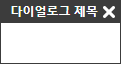
| title | string | 다이얼로그의 제목을 설정합니다.
| |||||
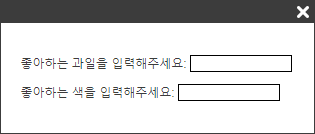
| bodyHTML | string | 다이얼로그의 내용 HTML을 설정합니다.
|
| |||||||
| bodyClassNames | string[] | 다이얼로그에 클래스를 설정합니다. 설정한 클래스 이름은 다이얼로그의 Body 부분(.se-dialog-body)에 추가됩니다.
|

| |||||||
| footerButtons | Object[] | 다이얼로그의 버튼을 설정합니다. 각각의 버튼에 설정할 수 있는 값은 아래와 같습니다.
|


기본 다이얼로그 이벤트 설정하기
customDialog.attachEvent()
...
| Code Block | ||
|---|---|---|
| ||
var customDialog = editor.createCustomDialog('myCustomDialog');
customDialog.attachEvent(); |
예제
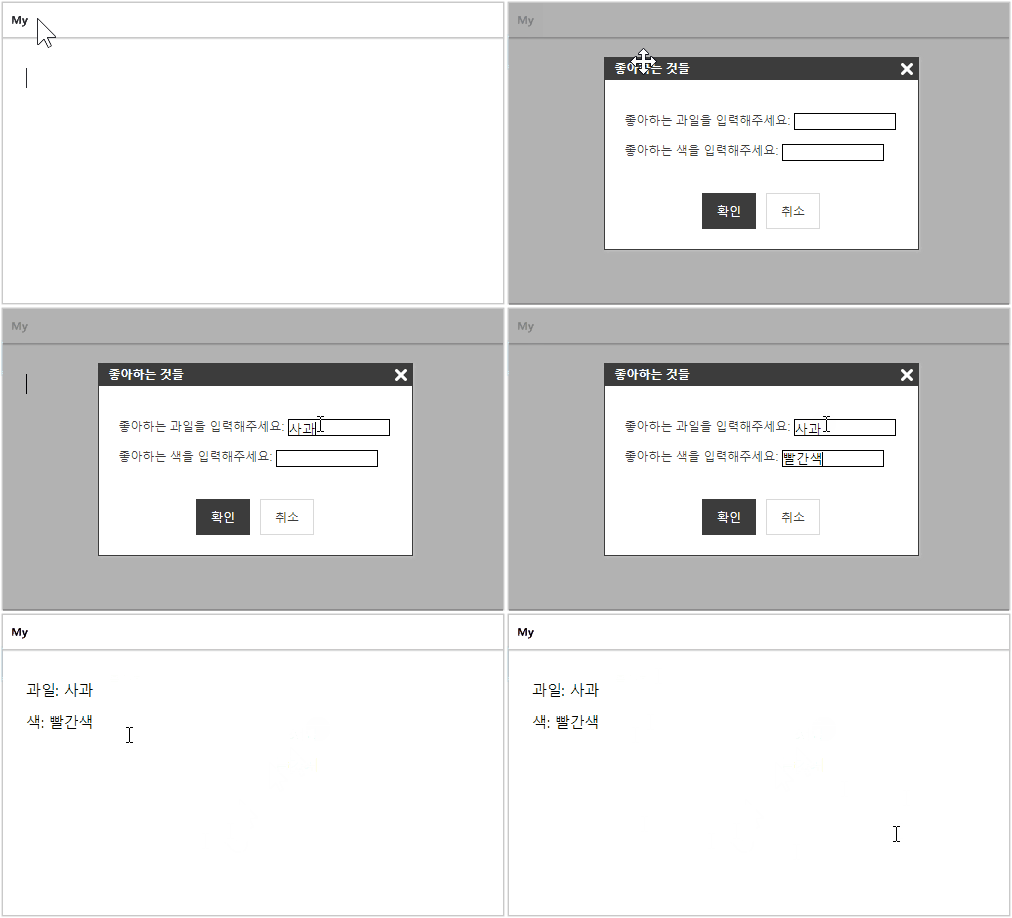
다이얼로그로 입력받은 텍스트를 에디터에 삽입하기
PluginGenerator 정의
| Code Block | ||||
|---|---|---|---|---|
| ||||
var pluginName = 'favoriteThingsPlugin'; var pluginGenerator = function (editor) { var dialogName = 'favoriteThings'; var customDialog = editor.createCustomDialog(dialogName, { title: '좋아하는 것들', bodyHTML: '<p>좋아하는 과일을 입력해주세요: <input id="favorite-fruits" style="border: 1px solid black; width: 100px; vertical-align: middle;" /></p>' + '<p>좋아하는 색을 입력해주세요: <input id="favorite-colors" style="border: 1px solid black; width: 100px; vertical-align: middle;" /></p>', footerButtons: [ { type: 'confirm', point: true, label: '확인' }, { type: 'cancel', point: false, label: '취소' } ] }); customDialog.attachEvent(); // 다이얼로그가 열릴 때 동작 설정 customDialog.setShowAction(function () { // <input> 태그 초기화 var favoriteFruits = document.getElementById('favorite-fruits'); var favoriteColors = document.getElementById('favorite-colors'); favoriteFruits.value = ''; favoriteColors.value = ''; }); // 확인 버튼을 클릭했을 때 이벤트 설정 customDialog.setConfirmAction(function () { var favoriteFruits = document.getElementById('favorite-fruits'); var favoriteColors = document.getElementById('favorite-colors'); var html = '<p>과일: ' + favoriteFruits.value + '</p><p>색: ' + favoriteColors.value + '</p>'; editor.insertHTML(html); }); // 확인 버튼을 클릭했을 때 confirm 실행 customDialog.getElement().on('click', '.se-confirm', function () { customDialog.confirm(); }); return { dialogs: [customDialog], buttonDef: { label: '좋아하는 것들 입력하기', iconSVG: '<svg xmlns="http://www.w3.org/2000/svg" version="1.1" viewBox="0 0 16 16"><path fill="#000000" d="m0.87505,11.53123"/><path fill="#000000" d="m778,528c-777.37495,-521.28124 16,-214 36,-116c20,98 39,-86 84,-8"/><path d="m0.28892,11.78233c0,0 -0.0488,-7.61347 -0.0449,-7.63397c0.0449,0.02034 2.19229,0.0205 2.14739,0c0.04499,0 2.24109,5.6818 2.19619,5.6613c0.0449,0.0205 2.19229,-5.6896 2.14739,-5.7101c0.0449,0.0205 2.14348,0.0205 2.09858,0c0.045,0 0.0449,7.68417 0,7.66227c0,0.02288 -1.37119,0.0205 -1.41532,0c0.04315,0 0.0449,-6.08023 0,-6.10054c0,0.01978 -2.2489,6.21864 -2.2938,6.19815c0.0449,0.0205 -1.08184,0.0205 -1.1225,0c0.04214,0 -2.63934,-6.66569 -2.68424,-6.68619c0.58175,0.0205 0.0449,6.6136 0,6.58858c0,0.02681 -1.0288,0.0205 -1.0288,0.0205z" fill="#000000"/><path d="m9.84484,6.32072c0,0 2.41249,5.67644 2.40681,5.64711c0.00568,0.02933 -0.46736,1.44844 -0.9877,1.44844c-0.52034,0 -1.13529,-0.18921 -1.14097,-0.21855c0.00568,0.02933 0.00568,1.25923 0,1.2299c0.00568,0.02933 1.42479,0.02933 1.41911,0c0.00568,0.02933 1.33018,-0.30179 1.85052,-1.91012c0.52034,-1.60832 2.45979,-6.24408 2.45411,-6.27342c0.00568,0.02933 -1.74456,0.02933 -1.75024,0c0.00568,0.02933 -1.27152,3.86093 -1.2772,3.8316c0.00568,0.02933 -1.27152,-3.80227 -1.2772,-3.8316c0.00568,0.02933 -1.69725,0.07663 -1.69725,0.07663z" fill="#000000"/></svg>', onClickFunc: function (e) { editor.execCommand('showDialog', dialogName); } } }; }; SynapEditor.addPlugin(pluginName, pluginGenerator); |
작성한 플러그인 로드
| Code Block | ||||
|---|---|---|---|---|
| ||||
<!-- synapeditor plugin -->
<script type="text/javascript" src="./plugins/favoriteThingsPlugin.js"></script> |
에디터 툴바 영역에 플러그인 버튼 달기
| Code Block | ||||||
|---|---|---|---|---|---|---|
| ||||||
'editor.toolbar': [ 'favoriteThingsPlugin' ] |
결과