| Table of Contents |
|---|
1. 설치
사이냅에디터 설치파일은 아래와 같이 구성되어 있습니다.
...
| Code Block | ||||||
|---|---|---|---|---|---|---|
| ||||||
<!DOCTYPE html>
<html lang="ko">

<head>
<meta charset="utf-8">
<meta http-equiv="X-UA-Compatible" content="IE=edge">
<meta name="viewport" content="width=device-width, initial-scale=1.0, minimum-scale=1.0, maximum-scale=1.0, user-scalable=no, shrink-to-fit=no">
<title>Synap Editor | Unlimited Rich Text Editor</title>
<link href="resource/synapeditor/synapeditor.min.css" rel="stylesheet" type="text/css">
<script src="https://code.jquery.com/jquery-3.3.1.js"></script>
<script src="synapeditor/synapeditor.config.js"></script>
<script src="resource/synapeditor/synapeditor.min.js"></script>
<script>
$(document).ready(function() {
	var se = new SynapEditor("synapEditor", synapEditorConfig);
});
</script>
<body>
	<form id="seform" name="seform" action="/save" method="post">
		<textarea id="synapEditor"></textarea>
		<input type="submit" value="SAVE"/>
	</form>
</body>
</html> |
...
4.
...
외부모듈
| Anchor | ||||
|---|---|---|---|---|
|
...
4.1 코드미러 적용
코드미러를 적용하면 에디터의 '소스 보기' 에서 코드 편집을 원활하게 할 수 있습니다.
...
| Code Block | ||||||||
|---|---|---|---|---|---|---|---|---|
| ||||||||
<!-- code mirror --> <script type="text/javascript" src='https://cdnjs.cloudflare.com/ajax/libs/codemirror/5.39.0/codemirror.min.js'></script> <script type="text/javascript" src="https://cdnjs.cloudflare.com/ajax/libs/codemirror/5.39.0/mode/xml/xml.min.js"></script> <link rel='stylesheet' href='https://cdnjs.cloudflare.com/ajax/libs/codemirror/5.39.0/codemirror.min.css'> |
...
4.2
...
엑셀 함수 사용
| Anchor | ||||
|---|---|---|---|---|
|
| Status | ||
|---|---|---|
|
formula parser를 적용하면 에디터에서 수식 편집을 엑셀 함수를 사용 할 수 있습니다.
- formula-parser script를 html에 추가하지 않을 경우 수식 엑셀 함수 입력칸 노출되지 않습니다.
- formula-parser script를 html에 추가하지 않을 경우 임포트시 문서의 수식 연속된 편집 가능하지 않습니다엑셀 문서에 포함된 함수를 사용 할 수 없습니다.
| Code Block | ||||
|---|---|---|---|---|
| ||||
<!-- formula-parser --> <script type="text/javascript" src="../resource/formula-parser.min.js"></script> |

...
5 에디터 플러그인
...
5.1 ToastUI 이미지 에디터 적용
| Status | ||
|---|---|---|
|
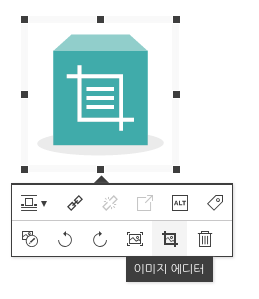
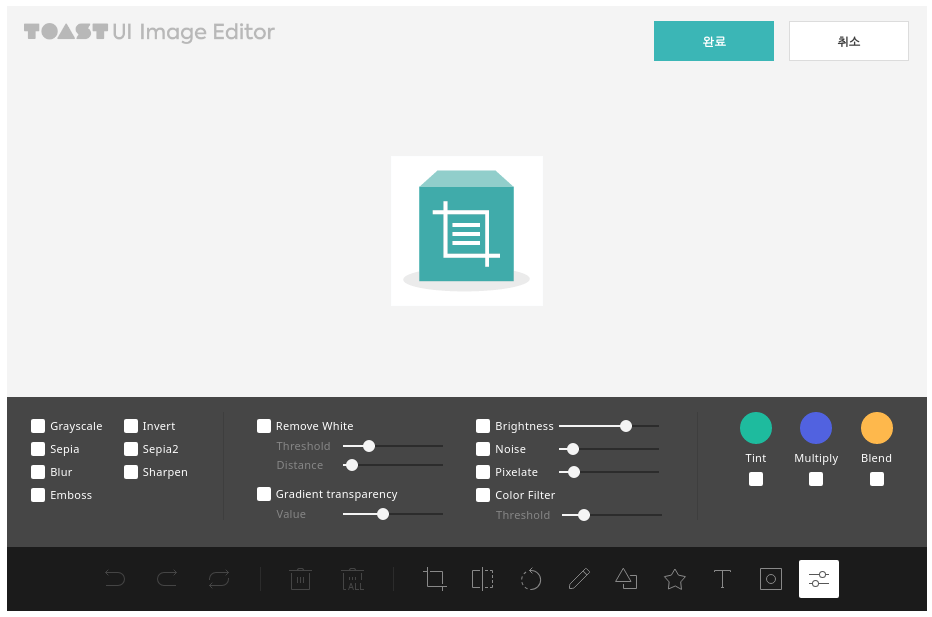
이미지 에디터를 적용하면 이미지에 다양한 효과를 적용할 수 있습니다.
...
| Code Block | ||||||
|---|---|---|---|---|---|---|
| ||||||
// 플러그인 설정에 "tuiImageEditor" 추가
"editor.plugins": [{
    name: "tuiImageEditor",
    position: {
        imageBalloon: -1 // 이미지 벌룬의 -1 위치에 버튼 추가
    }
}], |
|
|
...
6. 임포트 및 업로드 API 설정
환경설정 파일에 임포트 및 업로드 API 경로를 등록합니다.
...