기존에는 다이얼로그, 풍선 팝업, 툴팁과 같은 UI 요소들이 에디터 안에서 관리되어, 에디터 내부에서만 이동할 수 있었습니다.
이제 이러한 요소들이 에디터 외부에서 관리되면서, 에디터 영역을 벗어나도 자유롭게 이동할 수 있습니다.
이에 따라, 이 요소들과 관련된 CSS 스타일을 별도로 설정해야 합니다.
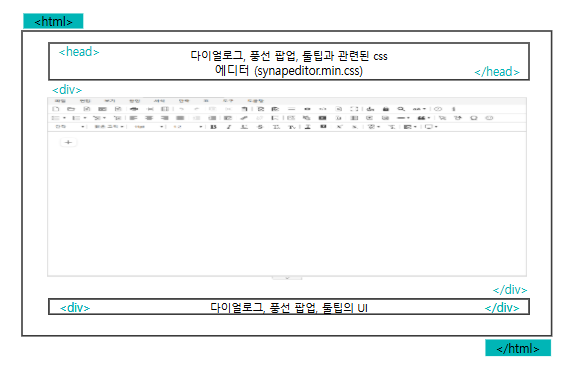
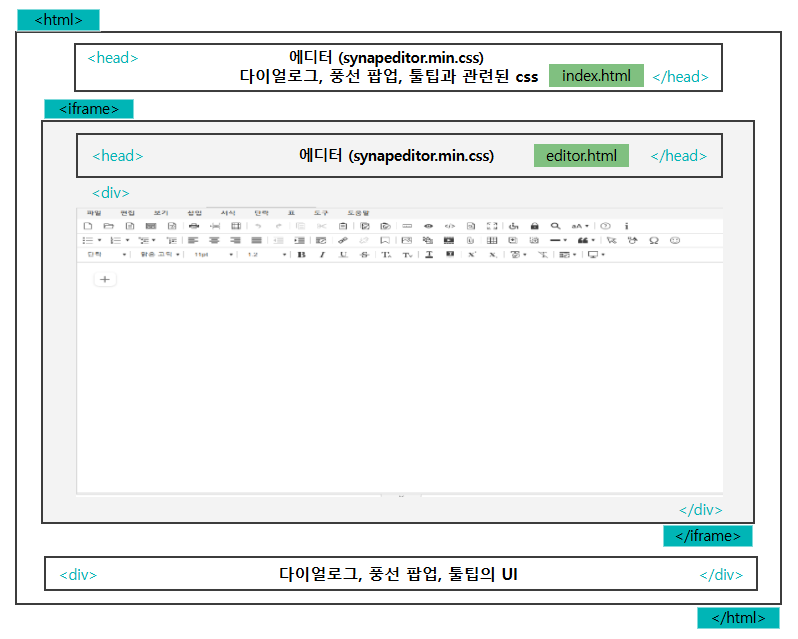
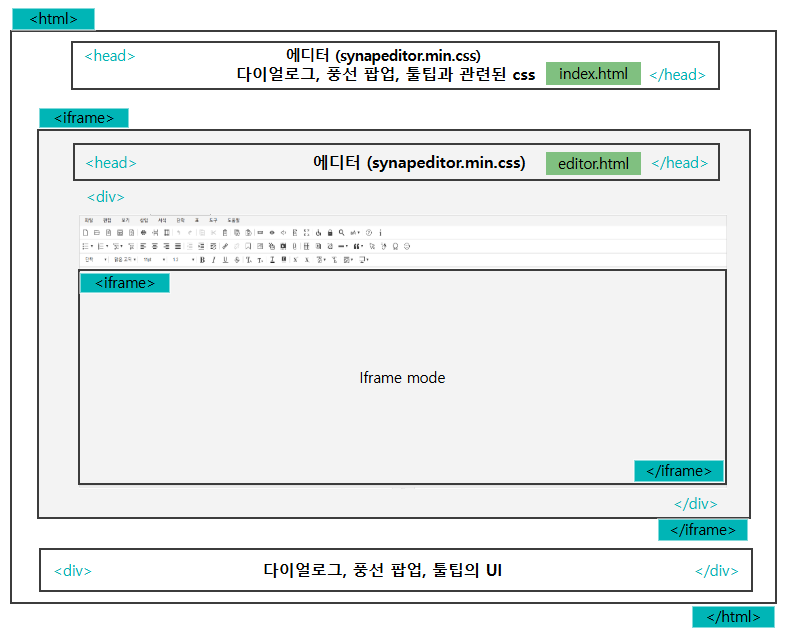
| 일반 mode | 에디터는 <div> 태그 내에 위치합니다. |
| Iframe | 에디터가 <iframe> 안에 위치합니다. |
| Iframe mode | 에디터가 <iframe> 안에 위치하고, 그 내부에 또 다른 <iframe>이 포함됩니다. |
CSS 추가 방법
- HTML 파일에 <link>태그를 추가하여 CSS 스타일을 추가할 수 있습니다.
- 예를 들어, editor.html, index.html 등의 파일에 아래와 같이 적용합니다.
editor.html 설정 예시
위의 그림과 같이 synapeditor.min.css는 최상위 haed에 위치합니다.
| Code Block |
|---|
| language | xml |
|---|
| theme | Emacs |
|---|
| title | editor.html |
|---|
| linenumbers | true |
|---|
|
<!-- SynapEditor 객체가 존재해야 적용할 수 있기 때문에 에디터 스크립트 파일 아래에 include 해야 합니다 -->

<link rel='stylesheet' href='../dist/synapeditor.min.css'> |
index.html 설정 예시
| Code Block |
|---|
| language | xml |
|---|
| theme | Emacs |
|---|
| title | index.html |
|---|
| linenumbers | true |
|---|
|
<!-- SynapEditor 객체가 존재해야 적용할 수 있기 때문에 에디터 스크립트 파일 아래에 include 해야 합니다 -->

<!-- 다이얼로그, 풍선 팝업, 툴팁과 관련된 css의 url -->
<link rel="stylesheet" href="externalContainerStyle.css의 url">
<link rel="stylesheet" href="shapeEditor.min.css의 url">
<link rel="stylesheet" href="webAccessibilityChecker.min.css의 url">
<link rel="stylesheet" href="webSpellChecker.min.css의 url">
<link rel="stylesheet" href="personalDataProtection.min.css의 url">
<link rel="stylesheet" href="characterPicker.min.css의 url">
<link rel="stylesheet" href="documentComparison.min.css의 url">
<link rel="stylesheet" href="formEditor.min.css의 url">
<link rel="stylesheet" href="forbiddenWordDetection.min.css의 url">
... |
config 설정
'editor.external.container.selector' 설정으로 다이얼로그 등의 UI가 위치할 Element를 찾는 Selector를 지정합니다.
| Info |
|---|
Selector를 지정하지 않으면, 기본적으로 최상위 요소인 <body> 아래에 위치하게 됩니다. |
| Code Block |
|---|
| language | js |
|---|
| theme | Emacs |
|---|
| title | synapeditor.config.js |
|---|
| linenumbers | true |
|---|
|
var synapEditorConfig = {
	...
	/**
     * 외부 컨테이너가 위치할 Element를 찾는 Selector를 설정합니다.
     */
    'editor.external.container.selector': '';
	...
} |
| Code Block |
|---|
| language | js |
|---|
| theme | Emacs |
|---|
| title | Selector 지정 예시 |
|---|
|
{
	'editor.external.container.selector': '#synapeditorUI';
} |
| Code Block |
|---|
| language | js |
|---|
| theme | Emacs |
|---|
| title | 결과 값 |
|---|
|
<body>
...
<editor></editor>
<div id="synapeditorUI">
	<div class="se-external-container-wapper">
		<div id="editorId_container" class="se se-external-container">
			<div class="se-balloon-container"></div>
			<div class="se-dialog-container"></div>
			<div class="se-tooltip-container"></div>
		</div>
	</div>
</div>
</body> |