...
이에 따라, 이 요소들과 관련된 CSS 스타일을 별도로 설정해야 합니다.
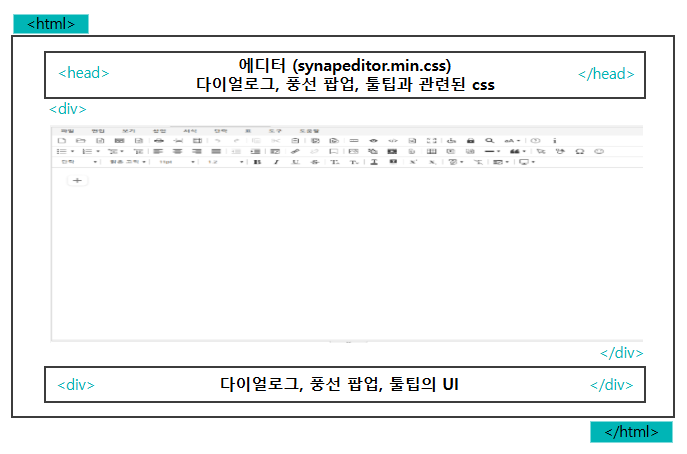
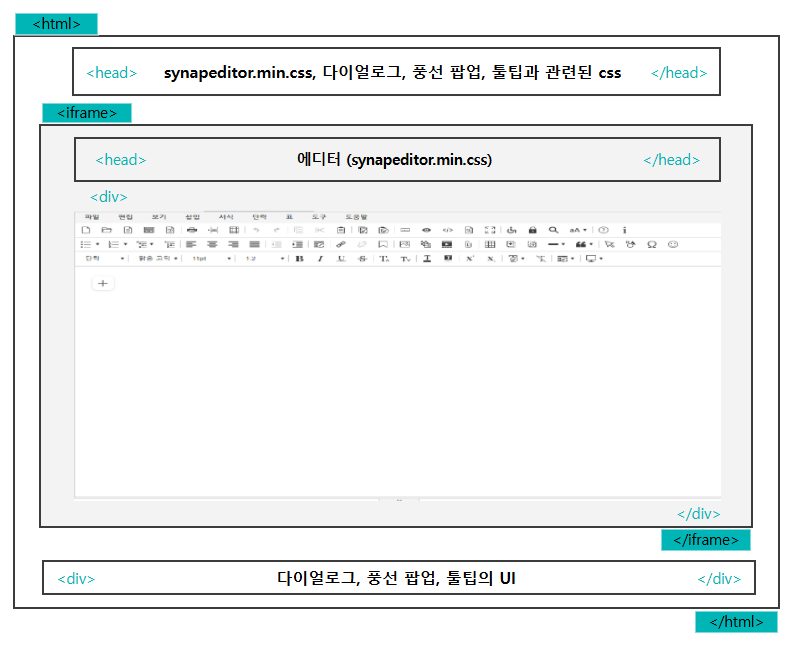 Image Removed
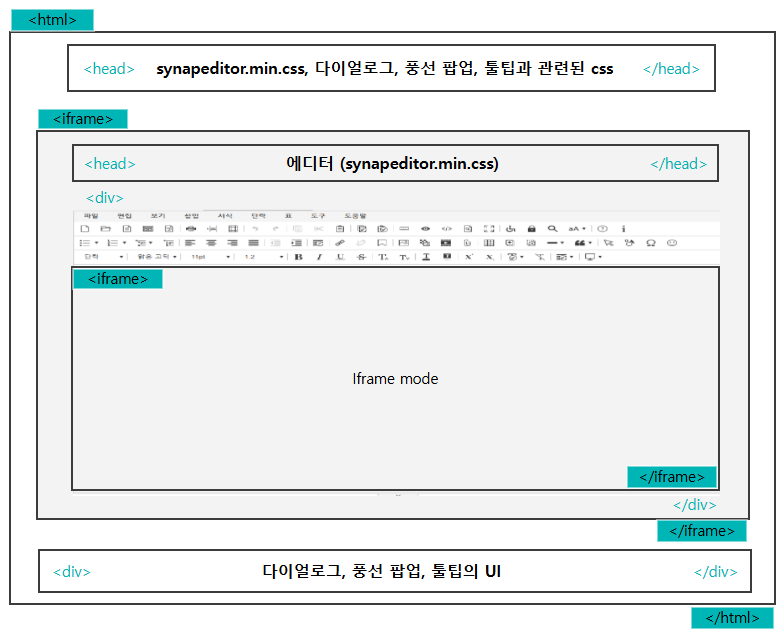 Image Removed
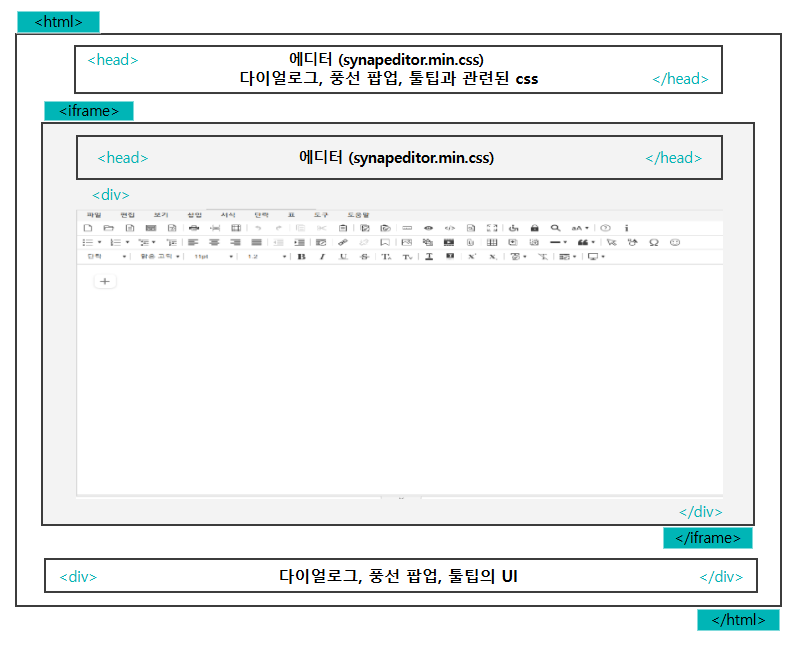 Image Added
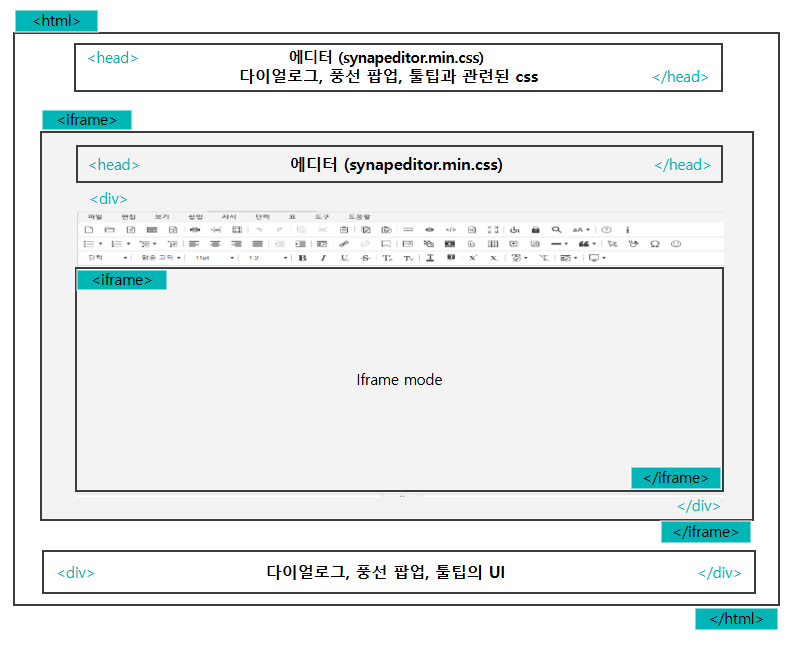 Image Added
| 일반 mode | 에디터는 <div> 태그 내에 위치합니다. |
| Iframe | 에디터가 <iframe> 안에 위치합니다. |
| Iframe mode | 에디터가 <iframe> 안에 위치하고, 그 내부에 또 다른 <iframe>이 포함됩니다위치하며, 편집 영역이 <iframe>안쪽에 위치합니다. |
| Info |
|---|
| title | Iframe mode는 config를 통해 설정이 가능합니다. |
|---|
|
>> iframe mode 설정하기 |
CSS 추가 방법
- HTML 파일에 <link>태그를 추가하여 CSS 스타일을 추가할 수 있습니다.
- 예를 들어, editor.html, index.html 등의 파일에 아래와 같이 적용합니다.
- 위의 그림과 같이 synapeditor.min.css는 최상위 haed에
...
editor.html 설정 예시
| Code Block |
|---|
| language | xml |
|---|
| theme | Emacs |
|---|
| title | editor.html |
|---|
| linenumbers | true |
|---|
|
<!-- SynapEditor 객체가 존재해야 적용할 수 있기 때문에 에디터 스크립트 파일 아래에 include 해야 합니다 -->

<link rel='stylesheet' href='../dist/synapeditor.min.css'> |
index.html 설정 예시
- synapeditor.min.css을 설정하지 않으면 문서비교 문서 이력 비교, 임포트 및 워드 미리보기를 확인할 수 없습니다.미리보기 확인 시 스타일이 적용되지 않아 틀어져 보입니다.
| Code Block |
|---|
| language | xml |
|---|
| theme | Emacs |
|---|
| title | index.html |
|---|
| linenumbers | true |
|---|
|
<link rel='stylesheet' href='../dist/synapeditor.min.css'>

<!-- 다이얼로그, 풍선 팝업, 툴팁과 관련된 css의 url -->
<link rel="stylesheet" href="externalContainerStyleexternalStyle.css의 url">
<link rel="stylesheet" href="shapeEditor.min.css의 url">
<link rel="stylesheet" href="webAccessibilityChecker.min.css의 url">
<link rel="stylesheet" href="webSpellChecker.min.css의 url">
<link rel="stylesheet" href="personalDataProtection.min.css의 url">
<link rel="stylesheet" href="characterPicker.min.css의 url">
<link rel="stylesheet" href="documentComparison.min.css의 url">
<link rel="stylesheet" href="formEditor.min.css의 url">
<link rel="stylesheet" href="forbiddenWordDetection.min.css의 url">
<link rel="stylesheet" href="ocr.min.css의 url"> |
config 설정
'editor.external.container.selector' 설정으로 다이얼로그 등의 UI가 위치할 Element를 찾는 Selector를 지정합니다.
...