다이얼로그 | Status |
|---|
| |
|---|
| colour | Yellow |
|---|
| title | 릴리즈 3.1.2501이상 |
|---|
|
| Status |
|---|
| |
|---|
| colour | Yellow |
|---|
| title | 릴리즈 2.19.2501이상 |
|---|
|
기존에는 다이얼로그, 풍선 팝업, 툴팁과 같은 UI 요소들이 에디터 위에 생성되며, 다른 UI 요소에 가려지지 않게 됩니다.기존에는 이러한 UI 요소들이 에디터 내에서 관리되어 에디터 내부에서만 이동이 가능했지만, 에디터 밖에 관리를 함으로서 에디터를 벗어나도 자유롭게 움직일 안에서 관리되어, 에디터 내부에서만 이동할 수 있었습니다.
이제 이러한 요소들이 에디터 외부에서 관리되면서, 에디터 영역을 벗어나도 자유롭게 이동할 수 있습니다.
이로 인해, 다이얼로그, 풍선 팝업, 툴팁에 이에 따라, 이 요소들과 관련된 CSS 스타일을 별도로 설정해야 합니다.
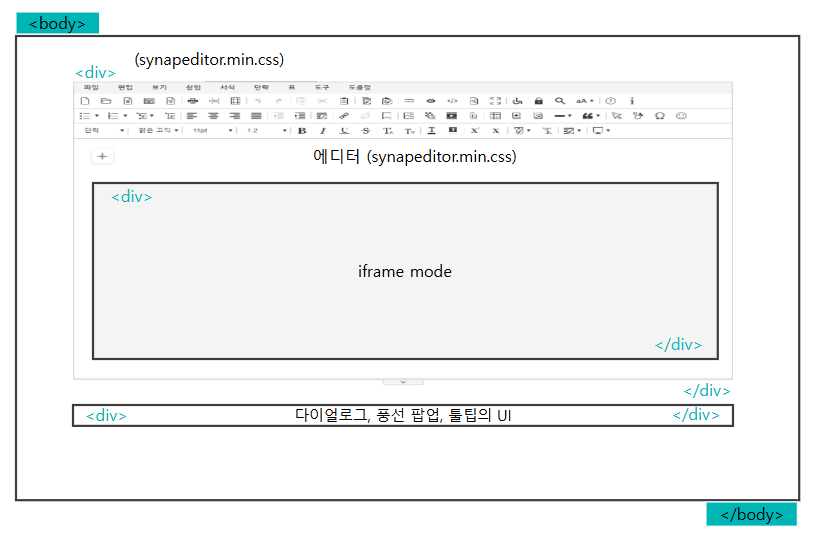 Image Removed
...
.
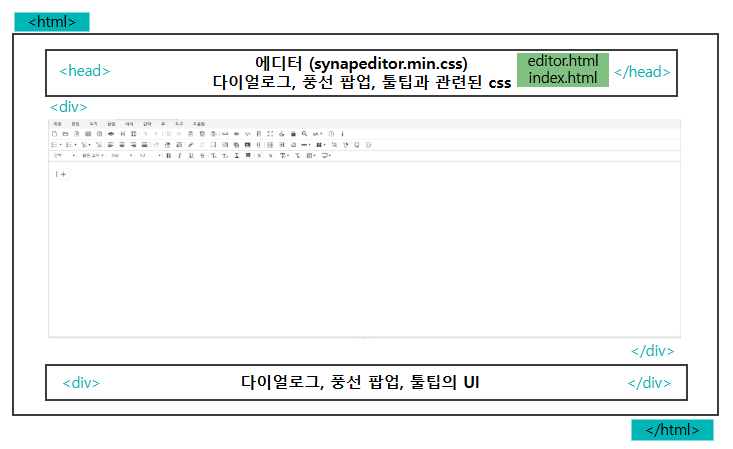 Image Added
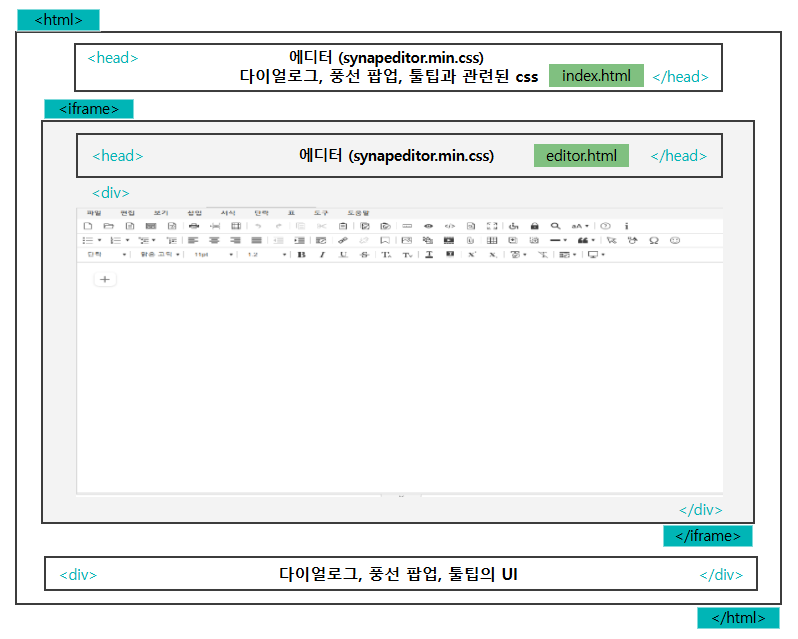 Image Added
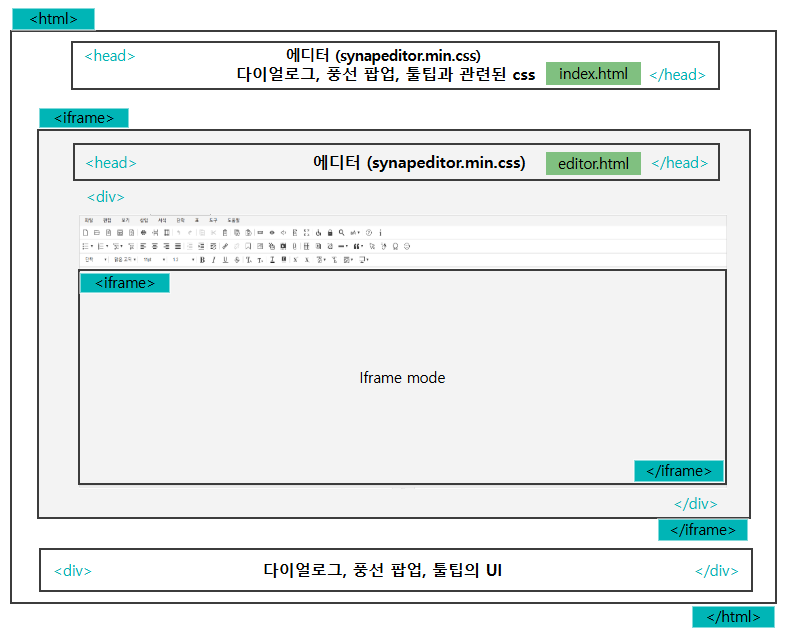 Image Added
| 일반 mode | 에디터는 <div> 태그 내에 위치합니다. |
| Iframe | 에디터가 <iframe> 안에 위치합니다. |
| Iframe mode | 에디터가 <iframe> 안에 위치하며, 편집 영역이 <iframe>안쪽에 위치합니다. |
| Info |
|---|
| title | Iframe mode는 config를 통해 설정이 가능합니다. |
|---|
|
>> iframe mode 설정하기 |
CSS 추가 방법
- HTML 파일에 <script> 코드 블록을 동일한 구조로 <link>태그를 추가하여 CSS 스타일을 설정할 추가할 수 있습니다.
- 예를 들어, editor.html, index.html 등의 파일에서도 아래와 같은 방식으로 설정을 적용할 수 있습니다파일에 아래와 같이 적용합니다.
editor.html 설정 예시
| Code Block |
|---|
| language | xml |
|---|
| theme | Emacs |
|---|
| title | editor.html |
|---|
| linenumbers | true |
|---|
|
<!-- SynapEditor 객체가 존재해야 적용할 수 있기 때문에 에디터 스크립트 파일 아래에 include 해야 합니다 -->

<link rel='"stylesheet'" href='synapeditor.min.css의 url'"../synapeditor.min.css"> |
index.html 설정 예시
| Warning |
|---|
synapeditor.min.css을 설정하지 않으면 문서 이력 비교, 임포트 및 워드 미리보기의 스타일이 적용되지 않습니다. |
- 위의 그림과 같이 synapeditor.min.css는 최상위 haed에 설정해야 합니다.
| Code Block |
|---|
| language | xml |
|---|
| theme | Emacs |
|---|
| title | index.html |
|---|
| linenumbers | true |
|---|
|
<link rel="stylesheet" href="../synapeditor.min.css">

<!-- 다이얼로그, 풍선 팝업, 툴팁과 관련된 css의 url -->
<link rel="stylesheet" href="tuiImageEditorexternalStyle.css의 url">
<link rel="stylesheet" href="shapeEditor.min.css의 url">
<link rel="stylesheet" href="webAccessibilityChecker.min.css의 url">
<link rel="stylesheet" href="webSpellChecker.min.css의 url">
<link rel="stylesheet" href="quoteExtensionpersonalDataProtection.min.css의 url">
<link rel="stylesheet" href="horizontalLineExtensioncharacterPicker.min.css의 url">
<link rel="stylesheet" href="forbiddenWordDetectiondocumentComparison.min.css의 url">
<link rel="stylesheet" href="formEditor.min.css의 url">
<link rel="stylesheet" href="aiWriteSupporter"forbiddenWordDetection.min.css의 url">
<link rel="stylesheet" href="ocr.min.css의 url"> |
script로 설정 예시
| Code Block |
|---|
| language | js |
|---|
| theme | Emacs |
|---|
| linenumbers | true |
|---|
|
// 에디터 초기화할 때 script를 추가하여 css를 적용
initEditor = () => {
   ...
   const paths = [
      'synapeditor.min.css의 url',
      'externalStyle.css의 url',
      'shapeEditor.min.css의 url',
      'webAccessibilityChecker.min.css의 url',
      'webSpellChecker.min.css의 url',
      'personalDataProtection.min.css의 url',
      'characterPicker.min.css의 url',
      'documentComparison.min.css의 url',
      'formEditor.min.css의 url',
      'forbiddenWordDetection.min.css의 url',
      'ocr.min.css의 url'
   ];

   const topDocument = window.top.document;
   paths.forEach(function (cssFile) {
      if (topDocument.querySelector(`[href=' + cssFile + ']`)) {
         return;
      }

      var link = topDocument.createElement('link');
      link.rel = 'stylesheet';
      link.href = cssFile;
      topDocument.head.appendChild(link);
   });
   ...
   window.editor = new SynapEditor(editorId, that.editorConfig, html, eventListener);
} |
config 설정
'editor.external.container.selector' 설정으로 다이얼로그 등 등의 UI가 위치할 Element를 찾는 Selector를 지정합니다.
| Info |
|---|
Selector를 지정하지 않으면, 기본적으로 최상위 요소인 <body> 아래에 위치하게 됩니다. |
...
| Code Block |
|---|
| language | js |
|---|
| theme | Emacs |
|---|
| title | synapeditor.config.js |
|---|
| linenumbers | true |
|---|
|
var synapEditorConfig = {
	...
	/**
     * 외부 컨테이너가 위치할 Element를 찾는 Selector를 설정합니다.
     */
    'editor.external.container.selector': '';
	...
} |
| Code Block |
|---|
| language | js |
|---|
| theme | Emacs |
|---|
| title | Selector 지정 예시 |
|---|
|
{
	'editor.external.container.selector': '#synapeditorUI';
} |
| Code Block |
|---|
| language | js |
|---|
| theme | Emacs |
|---|
| title | 결과 값 |
|---|
|
<html>
	<head></haed>
	<body>
	...
	<editor></editor>
	<div id="synapeditorUI">
		<div class="se-external-container-wapper">
			<div id="synapeditorUIeditorId_container" class="se se-external-container"></div>>
				<div class="se-balloon-container"></div>
				<div class="se-dialog-container"></div>
				<div class="se-tooltip-container"></div>
			</div>
		</body>div>
	</div>
</html>body> |