You can freely deploy arrange and use various features provided by SynapEditor.
Configuration Method
Use "editor.toolbar" key on initialization to configure the toolbar features.
| Code Block | ||||||
|---|---|---|---|---|---|---|
| ||||||
{
	'editor.toolbar': [
		'new','open','|',
		'paragraphStyleWithText', '|',
		'fontFamilyWithText', '|',
		'fontSizeWithText', '|',
		'bold', 'italic', 'underline', 'strike', '|',
		'fontColor', 'fontBackgroundColor'
	]
} |
[Application result]

Basic
SettingsConfiguration
The basic toolbar settings are configuration is as follows.
| Code Block | ||||||
|---|---|---|---|---|---|---|
| ||||||
{
	'editor.toolbar': [
        'new', 'open', 'template', 'layout', '|',
        'undo', 'redo', '|',
        'copy', 'cut', 'paste', '|',
        'link', 'unlink', 'bookmark', '|',
        'image', 'background', 'video', 'file', '|',
        'table', 'div', 'horizontalLine', 'quote', '|',
        'specialCharacter', 'emoji', '-',
        'paragraphStyleWithText', '|',
        'fontFamilyWithText', '|',
        'fontSizeWithText', '|',
        'bold', 'italic', 'underline', 'strike', '|',
        'growFont', 'shrinkFont', '|',
        'fontColor', 'fontBackgroundColor', '|',
        'bulletList', 'numberedList', 'multiLevelList', '|',
        'align', '|',
        'lineHeight', '|',
        'decreaseIndent', 'increaseIndent'
    ],
} |
[Application result]

Using
All theEvery Features
To use all the every features provided by Synap EditorSynapEditor, remove 'editor.toolbar' setting.
You can preview the features at the Full Features page.
Icons and Actions
As for keys, icons, and descriptions of each function, please refer to the below.
| TOOLBAR KEY | ICON | ACTION |
|---|---|---|
| new |
| Create Creates a new document; existing content the current contents will be destroyeddiscarded. |
| open |
| Import Imports an MS Word / LibreOffice document. |
| Print Prints the current document. | |
| pageBreak |
| Insert Inserts page break. |
| template |
| Open Opens Templates dialogue box. |
| autoSave |
| Open Opens auto-saved document list. |
| undo |
| Undo Undoes the last command. |
| redo |
| Redo Redoes the last undone command. |
paragraphStyle |
| Set Sets paragraph style (P, H1 ~ H6). |
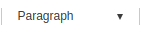
paragraphStyleWithText |
| Show Shows drop-down menu for paragraph styles. |
fontFamily |
| Set Sets font family. |
fontFamilyWithText |
| Show Shows drop-down menu for font familiesfamily. |
fontSize |
| Set Sets font size. |
fontSizeWithText |
| Show Shows drop-down menu for font sizessize. |
| customParagraphStyle |
| Show Shows predefined custom paragraph styles. |
| customRunStyle |
| Show Shows predefined custom text styles. |
| growFont |
| Larger Grows font size. |
| shrinkFont |
| Smaller Shrinks font size. |
| bold |
| Set Sets as boldface. |
| italic |
| Set Sets as italic. |
| underline |
| Set Sets as underlined. |
| strike |
| Set Sets as strikethrough. |
| superScript |
| Set Sets as superscript. |
| subScript |
| Set Sets as subscript. |
| fontColor |
| Set text color. |
| fontBackgroundColor |
| Set text background color. |
| align |
| Set text alignment. |
| copy |
| Copy the current selectionblock. |
| cut |
| Cut the current selectionblock. |
| paste |
| Paste the copied contents into the current position. |
| copyRunStyle |
| Copy text style only. |
| pasteRunStyle |
| Paste text style to the current selectionblock. |
| removeRunStyle |
| Clear text formatting from the current selectionblock. |
| link |
| Insert link to the current selectionblock. |
| unlink |
| Delete current Remove the selected link. |
| table |
| Insert table. |
| image |
| Insert image. |
| background |
| Set background image/color for the whole document. |
| video |
| Insert video. |
| file |
| Insert file. |
| horizontalLine |
| Insert horizontal line. |
| shapeEditor |
| Insert shape. |
| specialCharacter |
| Insert special character. |
| emoji |
| Insert emoji character. |
| div |
| Insert a <div> layer. |
| drawDiv |
| Insert a <div> layer by mouse dragging. |
| quote |
| Insert quote. |
| bulletList |
| Set the current selection block as bulleted (unordered) list. |
| numberedList |
| Set Set the current selection block as numbered (ordered) list. |
| multiLevelList |
| Set Set the current selection block as multi-level list. |
| increaseIndent |
| Increase indentation level for the current paragraph. |
| decreaseIndent |
| Decrease indentation level for the current paragraph. |
| lineHeight |
| Set line spacing for the current paragraph. |
| lineHeightWithText |
| Show drop-down menu for line spacing. |
| paragraphProperties |
| Open dialogue box for paragraph properties. |
| fullScreen |
| View full screen. |
| source |
| View source code. |
| preview |
| Change to preview mode. |
| ruler |
| Show ruler. |
| divOutline |
| Show/hide guiding box of layers. |
| accessibility |
| Open dialogue box for web accessibility check. |
| personalDataProtection |
| Open dialogue box for personal data protection. |
| find |
| Open dialogue box for find/replace. |
| | | Horizontal dividing line | |
| - | Vertical dividing line |